One AI brain for the whole organization.
We wire a private AI into the tools you already run, so everyone on your team can ask it and hand it work. On your hardware, in your cloud tenancy, or across both.
What an AI operating system is.
An AI operating system is a private AI layer that sits across an organization’s tools and knowledge. It connects models to the systems people already use, applies sign-in and permissions to every answer, and gives everyone one place to ask questions and hand off repeatable work. BlackHawk Data builds it on local hardware, in the client’s cloud tenancy, or across both.
AI tends to arrive one tool at a time, each with its own login and its own copy of your data. An operating system replaces that sprawl with one brain you own: connected once, governed once, and used by everyone.
Six layers, from the person asking down to the hardware.
The model in the middle is the easy part to buy. We build all six layers, because we already design and operate the bottom one. Scroll, and the brain builds itself from the outside in.
- Layer 1 of 6
People
Everyone asks in plain language: in chat, inside the tools they already use, or on a schedule.
What we do
We start with the jobs your teams keep not getting to, and design the interface around those.
Who asks it: service desk, engineers, finance, operations, leadership, field teams.
- Layer 2 of 6
Guardrails
Sign-in, permissions and an audit log sit in front of every answer.
What we do
People see only what their role already lets them see. Shadow AI discovery finds the tools already in use.
- Layer 3 of 6
Skills
Repeatable jobs the brain does on its own, each ending in a file, a ticket or a report.
What we do
Each one is scored against five tests before it is built, so effort goes where it pays.
- Layer 4 of 6
Knowledge and tools
Connections to the systems you run: service desk, documents, monitoring, identity, finance.
What we do
We wire these the way we wired our own platform: fixed, permission-checked tools instead of open access.
- Layer 5 of 6
Models
Local, cloud or both. Swappable, because the model is a setting and not the product.
What we do
We recommend and size the model for the job, and change it when a better one fits.
- Layer 6 of 6
Infrastructure
The compute, network and security the whole thing stands on.
What we do
Designed, built and operated 24x7 by the same engineers. This is the part we have always done.
Local, cloud or hybrid. The brain is the same; where it runs is your call.
Which model, which cloud and which hardware are outputs of the plan, not something we decide before we have seen the job. That is why none are named here.
Local
Models run on hardware you own.
Prompts, documents and answers stay inside your network. Most first deployments are one server, sometimes one workstation. Not a rack.
Best for
Regulated records, plant and enclave networks, and anything you would not send to a public API.
Cloud
Models run in your own cloud tenancy.
The brain sits under your sign-in, your logging and your agreements. There is no hardware to buy, and capacity follows demand.
Best for
Organizations already standardized on a cloud platform, and work that comes in bursts.
Hybrid
Private work stays local. Heavy work goes to the cloud.
A routing policy you approve decides, job by job, which model answers. Records you mark as sensitive never leave the local model.
Best for
Most organizations: a few sensitive jobs, and many ordinary ones.
Private work stays local. Heavy work goes to the cloud. A routing policy you approve decides, job by job, which model answers. Records you mark as sensitive never leave the local model.
Nobody starts at a brain. The road there has five stages.
It begins with finding the AI already in your tools, including what arrived inside applications you approved years ago.
Stage 1 of 5
Discover
You are here if
Nobody can say which AI tools and features touch company data.
What we do
- Inventory AI at the feature level, not just the application level: sign-ins, web traffic, SaaS settings and endpoints.
- Separate what people brought in from what arrived inside tools you already approved.
- Trace what data each one can reach.
What you end with
An AI register: every tool and embedded feature, the data it reaches, and who uses it.
Where AI hides in a stack you already ownStage 2 of 5
Protect
You are here if
You know what is in use, and some of it worries you.
What we do
- Find and fix oversharing before any assistant is switched on.
- Classify the data that matters, so policy has something to act on.
- Put DLP on prompts and uploads, starting in watch mode.
What you end with
Controls in place on every path data takes into AI, and a record of what they caught.
How the data is protectedStage 3 of 5
Govern
You are here if
People want to use AI, and nobody can tell them what is allowed.
What we do
- Give every capability an owner, a status, a data rule and a review date.
- Write a short policy people can follow, and an approval path for the next tool.
- Review vendor terms, and map the program to the NIST AI Risk Management Framework.
What you end with
An approved list, a way to add to it, and evidence ready for an auditor.
The process, step by stepStage 4 of 5
Adopt
You are here if
The guardrails exist. Now you want AI doing real work.
What we do
- Pick the first jobs by scoring them against five tests.
- Build each one on a model that fits: local, cloud or hybrid.
- Run it behind the controls from the first three stages.
What you end with
First workloads in production, each ending in a file, a ticket or a report.
Find your first AI workloadStage 5 of 5
Scale
You are here if
It works for one team. Now every team wants it.
What we do
- Connect the model to the tools the whole organization runs.
- Operate it around the clock with the rest of your environment.
- Keep discovering, because vendors keep shipping new AI features.
What you end with
An AI operating system: one private brain the whole organization can ask.
How the AI operating system works
One brain. Every team has a job for it.
Six of the 25 workloads we publish, each scored against 5 tests before anyone builds it.

Service desk
Runbook & policy retrieval for the helpdesk
The answer is in the runbook, the wiki, last year's PDF, or a Teams message from an engineer who has since left. Ask in plain language, get the passage and the source.
Infrastructure
Nightly infrastructure reconciliation
CMDB says one thing, DHCP says another, the directory says a third, and reality says something else again. Reconcile them overnight and write up only what disagrees.
Finance
Invoice, PO & remittance matching
Read the invoice PDF, pull line items, match against the PO and the receipt, and write up only the exceptions a human needs to judge.
Contracts
Contract & change-order obligations
Pull every date, deliverable, notice period and liquidated-damages clause out of an executed contract and its change orders, so the obligations live somewhere other than one person's memory.
Leadership
Grant reports & board packets
The numbers already exist in the finance system and the program database. Draft the quarterly grant report and the board packet narrative from the source records.
Security
Reported-phish triage
Every user-reported email, read and classified with a written rationale, so the queue is ranked before an analyst opens it.
AI is not a separate project. It is a step in every one.
We deliver in four phases. Each one now has an AI step, whatever the engagement started as.
Plan
Every plan names the first jobs worth giving to AI, scored against 5 tests.
Build
We connect the model to your tool stack and your sign-in, on infrastructure we design.
Operate
Our NOC and SOC run it around the clock with the rest of your environment.
Manage
Each review decides what the brain should learn next, and what to switch off.
We built ours first. Here is how it works.
OneVision, the platform our clients log in to, has its own AI Analyst. It is the same pattern we build for you, pointed at IT operations, and its rules are the ones we would put in front of your auditor.
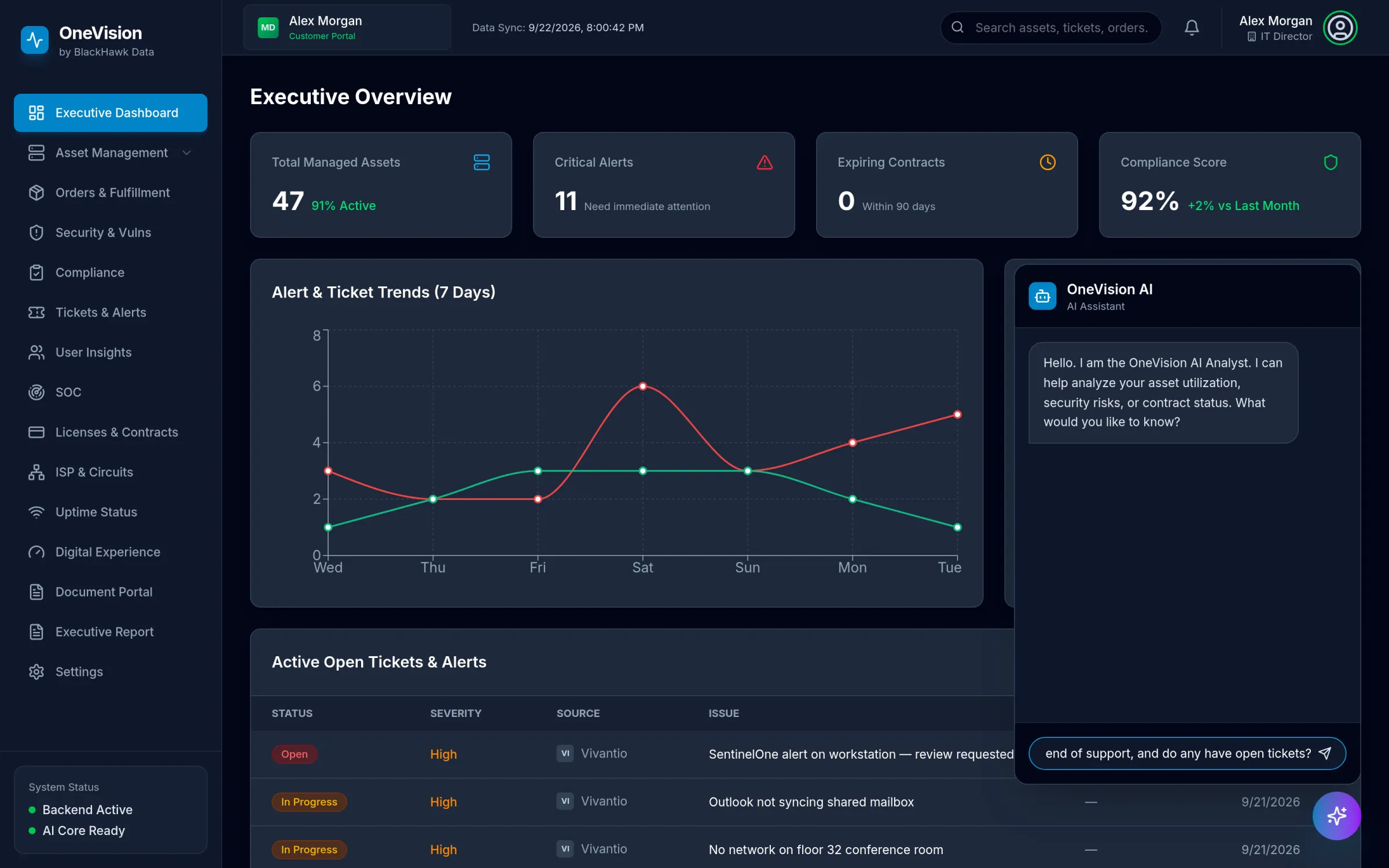
- It answers from your own data.
- Questions about your assets, risks, tickets and licenses are answered from your environment, with no report builder and no exports.
- It cannot go looking.
- The assistant can only call a fixed set of tools, each limited to one client. It never writes its own database queries.
- It respects the org chart.
- A person is shown only what their role’s own screens already show them.
- It is off until you switch it on.
- The feature is disabled by default and enabled client by client.
- It keeps a record.
- Every question is logged with the tools it used. The answers themselves are not stored.
- The model is a setting.
- It runs against a local model or a cloud model, and switching is a configuration change, not a rebuild.
Questions we get first.
- Does our data leave our network?
- In a local deployment, no: models run on hardware you own and your data never leaves your network. In a cloud deployment, models run inside your own cloud tenancy under your sign-in and logging. In a hybrid deployment, a routing policy you approve keeps the work you mark as sensitive on the local model.
- Do we need a datacenter full of GPUs to start?
- Usually not. Most first deployments are one server, sometimes one workstation, not a rack. AI-ready datacenter power, cooling and fabric matter when you scale, and we design those too.
- Where do we start?
- With one job. BlackHawk Data publishes 25 candidate workloads, each scored against 5 tests. Tell us about yours and our engineers send a written plan, with model recommendation, hardware sizing and deployment path, within five business days at no charge.
- Is this only for the IT department?
- No. The point of one shared brain is that the service desk, finance, operations, field teams and leadership all use the same one, each seeing only what their role allows. IT owns the guardrails; everyone else gets the answers.
Start with one job.
Pick the work your team keeps not getting to. Our engineers send a written plan, with model recommendation, hardware sizing and deployment path, within five business days at no charge.